Translations: German
Picture the screen above the supermarket cheese counter, calmly explaining in 4K why you need three packs of Gouda today. That's digital signage. A surprising amount of it runs on Linux.
Not because Linux is trendy, but because it's the better tool for the job: less hardware, fewer dependencies, no vendor holding your screens hostage. Here's where it pays off and where it still hurts.
TL;DR
Linux runs digital signage players on cheaper hardware, with fewer moving parts and no vendor lock-in. You strip the OS down to exactly what the player needs: no window manager, no pop-ups, no forced services. The catch is that low-cost hardware with proper Linux driver support is still hard to find. Worth the effort, but go in with open eyes.
What is Linux and What are the Differences to Android
To be precise, Linux is only the kernel. Together with the GNU software packages, it forms the unix-like operating system GNU/Linux.
Is Digital Signage with Linux Possible?
Linux is excellently suited for digital signage. This is true for server systems (CMS) as well as for players. Stable, free without artificial restrictions, and continuously developed by thousands of companies as well as volunteers. This makes Linux very secure and reduces the risk of malfunctions.
Distributions
Surely, you've heard names like Debian, Ubuntu, Arch, Gentoo, Mint, etc. These so-called Linux distributions include a package manager for installing the operating system and also applications. With the package manager you keep your Linux installation and applications up-to-date. The process is highly convenient. A complete Office installation or its update takes less than a minute. Total updates also do not block startup and shutdown for hours.
A free community maintains most Linux distributions. However, there are also companies such as Canonical (Ubuntu), Red Hat, or SUSE. They offer paid and professional support in addition to a free variant. Furthermore, these providers also certify hardware. Red Hat, which belongs to IBM, meanwhile, offers even up to 10 or 15 years of long-term support.
Differences from Android
The Android known from smartphones and tablets is based on a Linux kernel specially adapted by Google. However, the system is conceptually different. For example, it uses a different C library (Bionic) and most of its apps are based on a special Java runtime environment called ART (Android Runtime). Because of these differences, some experts do not consider Android to be a classic Linux distribution.
The Advantages
Linux systems are free software. Everything is open. This also applies to the development process and to the documentation. Therefore, the advantages of Linux go hand in hand with those of free software in general.
Stability is no Longer an Argument
Allow me to say one thing in advance: You will often hear arguments like virus-free and stability. This is only half of the truth. Other systems also run stable. This is now considered a minimum requirement in the 21st century. Fortunately, even the time of regular Windows blue screens is over. Of course, there are also fewer viruses for Linux, but any platform can be attacked nowadays.
The real advantages of Linux can be reduced to one word: Freedom! But what does that mean specifically for Digital Signage?
What are the Advantages of Linux for Digital Signage Players?
Digital signage players based on Linux do not need a window manager. There are no embarrassing pop-up dialog boxes and services that can't be switched off, as is the case with Windows and Android. You configure your player hardware down to the last detail according to your demands.
No Window Manager necessary
A media player can be put together extremely resource-saving without a window manager. The used media player acts as a graphical user interface at the same time. Advantage: The operating system does not display unexpected dialogs, error messages, or installation notes on the screens.
In 2008, I worked as a DevOps engineer in a company that assembled media player PCs based on Windows XP. One of the more annoying tasks was to write scripts to suppress Windows messages. The customers were not happy at all when dialogs popped up on their keyboard- and mouse-less digital signage totems.
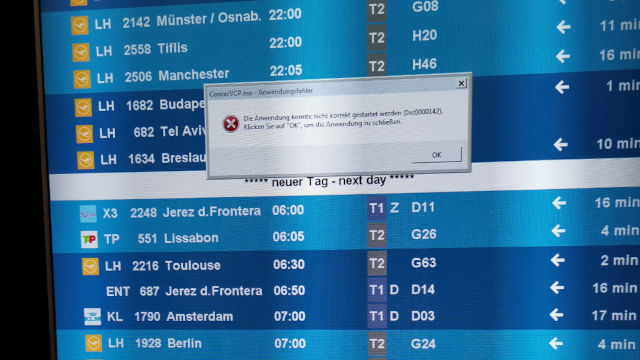
The incredible flexibility of Linux brings many advantages in terms of security, stability, and resource consumption, especially for digital signage player.
With Linux, all notifications can be redirected elegantly into log files and become invisible. The player sends these files automatically. Your customers and the technicians will love this solution.
Disable unneeded Services
Your requirements decide which services run and not the operating system manufacturer. This saves resources and increases stability as well as security. Every additional component and service increases the complexity of your system. Additional complexity increases the probability of errors and, in the worst case, opens the gates for viruses or Trojans. The less running on your digital signage solution, the better.
Savings on the Hardware Costs
The reasons described up to here already save costs. You will need less memory and a less powerful CPU for your digital signage hardware.
In the summer of 2016, out of sheer curiosity, I managed to get my garlic-player working on a first-generation Raspberry Pi Zero. Even HD videos played. Try to install Windows or Android on such 5 EUR hardware and play videos.
Easier Monitoring and Error Analysis
As mentioned in the last paragraph, virtually any notification can be redirected to log files. A quick-to-learn scripting language makes it possible to monitor the state of the system (memory, CPU) and send it regularly to one or more recipients.
Linux includes many small utilities out of the box. These work according to the Unix philosophy. That means they do only their one task, but perfectly. UNIX is about cooperation, automation, and combinability. You can solve many requirements with on-board tools without having to buy extra software.
In case of a fault, a team of technicians does not need VNC, Remote Desktop, or TeamViewer. They analyze and repair the device remotely with a text console.
No unsafe “rooting” necessary
To run Android media players as an interactive kiosk system, the manufacturer usually roots them. Root is called the system administrator in unix-like operating systems. But why does an Android device have to be rooted?
Remote Maintenance
Root permissions allow remote management to reboot or install software without prompting. In a digital signage network, remote maintenance capabilities are essential. No one wants to send expensive technicians to a device for every little thing. Without root, Android prompts the user for confirmation every time the device is rebooted or software is updated.
Hide Status Bar
Furthermore, the Android status bar can be hidden permanently. A functional status bar not only looks unprofessional in a kiosk system, but also carries the risk of abuse.
Indeed, the status bar allows the user to exit the kiosk program to get to the Android interface. Some manufacturers modify the Android operating system to allow an additional configuration option that hides the status bar. A suboptimal solution: These changes are incompatible with each other and complicate operating system updates.
Disadvantages of Rooting
A rooted Android causes a problem for digital signage security. Root means: Any program can manipulate files or (de)install apps. So, further security measures have to be taken. These, in turn, increase complexity. More complexity means more opportunities for errors and security holes. A vicious circle!
Therefore, I consider the use of TeamViewer to be a poor crutch. Besides, it is costly and troublesome to administer hundreds of devices with TeamViewer.
With Linux-based digital signage hardware, this effort would not be necessary!
Meanwhile, Google has mitigated some of these disadvantages with the so-called device owner mode. Unfortunately, this has not yet caught on with most Asian manufacturers.
Investment Security and fewer Dependencies
The source codes of Linux are under a free license. This is usually the GPL. That means: source texts may be changed and adapted at any time.
Advantage: Your digital signage solution is not dependent on a manufacturer (vendor lock-in). In the worst case, the vendor can discontinue support for its product. You might have many problems then. With Linux and open-source digital signage software, you choose another service provider with the appropriate know-how or take care of it yourself.
What are the Advantages of Linux for Digital Signage Servers?
A digital signage CMS needs a stable and secure foundation. Linux has become the leading server operating system over the last 30 years because it guarantees this. Due to the possibility to deactivate all unnecessary services and the unmatched high configurability, it can be perfectly hardened against hacker attacks and errors.
No Royalties
I raise the point only for completeness because I don't like this argumentation. Free software means, of course: no license fees. The money saved by this can, of course, be a relevant factor.
However, everyone should be aware of this in the professional environment: Good support services are not available free of charge. Digital signage software operated on the Internet requires continuous care and maintenance. Errors and security vulnerabilities that are found must be eliminated over the entire runtime. A professional digital signage installation always includes a service contract.
Conclusion Advantages
The freedom of digital signage open-source-software reduces dependencies and decreases business risks. In my view, this is the key advantage of Linux and free software. I see the free availability as a pleasant side effect.
Digital Signage with Linux in Practice
With Linux, you build efficient digital signage media players tailored exactly to the application profile. However, this freedom comes at a price. It is difficult to find devices on the market that fully support Linux.
This is not a problem for PCs with Intel or AMD processors and enough budget. However, many users want to play HD or 4K videos or display images only. Small, cost-effective devices from the Internet of Things (IoT) are sufficient for this. These usually manage without moving parts, such as fans, and hardly consume any power.
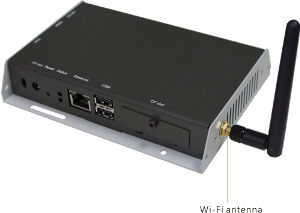
East Asian providers offer an almost limitless number of low-cost media players. Most run Android, but some devices offer the option of installing Linux as an alternative. However, keep an eye on the support when evaluating.
Manufacturer support
Basically, be cautious when choosing your digital signage hardware. Pay attention to whether the manufacturer offers regular updates. After all, this tends not to happen with the particularly cheap devices. Beyond that, you won't even get accurate information.
Some manufacturers do state Linux or Ubuntu support in their specifications, but are silent on the details like kernel version, video acceleration, or support periods. That means you might get devices with outdated operating systems.
Reasons for poor driver support
On the one hand, the lack of care is of course the fault of manufacturers who cut costs to the bone, as well as their buyers who only care about the price. On the other hand, the business practices of ARM Ltd. are also considerably to blame. ARM is a British microprocessor provider that doesn't manufacture CPUs itself, but merely designs them.
Companies such as Qualcomm, Samsung, Rockchip, as well as Apple, Intel, and others license a particular processor design and customize it for their product. The licensees usually have “their” CPUs produced as so-called “Systems On a Chip” (SoC).
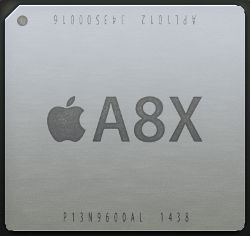
In contrast to the Linux philosophy, SoC producers offer non-free binary drivers for apparent patent reasons. Of course, these are not available in source code. Free programmers cannot customize or compile them. In addition, non-free drivers work only with a fixed kernel version. Therefore, these drivers also do not come into the so-called upstream or mainline kernel.
But this would be important because only from this original Linux kernel new improved versions are released on average every 8-9 weeks. A free upstreamable driver in the mainline kernel ensures that the hardware will still run properly with future updates over the coming years.
Mystery Monger
At the same time, device specifications, especially for the graphics and video processors (GPU/VPU) that are so important for us, are again kept protected for patent reasons. ARM (Mali) and also other GPU manufacturers like Imagination (PowerVR) fear that open drivers would reveal something about the internal workings of their chips to competitors.
Thus, even drivers voluntarily programmed by the OSS community can only be developed very laboriously through reverse engineering. Unfortunately, the video acceleration is then often the first thing missing.
In the past, the company Allwinner was considered an especially negative example. Although their processors are widely used, the software support was more than questionable, both legally and technically.
In addition, many Asian low-cost providers only solder the chips onto a circuit board and do not offer any further support themselves. This might be okay for private Netflix users, but an absolute no-go for a professional digital signage network!
Some companies declare even their documentation a state secret. In 2014, SmilControl and two resellers tried to get documentation from a well-known electronics multinational on how to address its integrated player.
We had customer requests at the time expressing interest in buying a high number of its SoC displays if their player worked with the SaaS CMS from SmilControl. The people in charge of this big company ignored even requests from their own sales managers, and we were not given proper documentation, although we signed non-disclosure agreements.
In the end, both reseller reinvented the wheel. They programmed their player solution and bought the displays of a competitor. Since then, I developed the Garlic player as free software, work only with SMIL, and basically refuse requests to support proprietary solutions.
The Challenges of Using Linux for Digital Signage
Linux isn't a free lunch. You get a world-class kitchen with the best ingredients, but you still have to cook. Setting up an open-source stack is no click-and-go: where a commercial system just runs, Linux asks for some technical skill and the occasional cryptic command. The payoff is control, stability, and security no off-the-shelf box can match.
Where is the Problem?
The mainline kernel continues to evolve. Buyers of poorly supported hardware are left with outdated, no longer customizable software. They do not benefit from the innovations and bug fixes of the further developed Linux kernel.
If the manufacturer does not care because from his perspective he does not earn money with it anymore, even serious bugs will not be fixed. This often happens and affects both Android and Linux devices. However, Linux has a large community. This can mitigate the consequences over time through reverse engineering.
Consequence: Costs due to Security Leaks
In September 2017, for example, BlueBorne became known. This is a security vulnerability in the so-called Bluetooth stack, which affects all systems (Windows, Linux, Android …). That means there are now millions of vulnerable devices in circulation which will never be fixed. The only effective protection is to disable a functionality that was once paid for.
Those who operate an affected device pool and rely on Bluetooth are now faced with two alternatives: either live with the gap and the associated risk, or destroy working, tried-and-tested hardware.
That cuts into both the cost and ecological balances. More openness and free drivers could prevent this and significantly increase the lifetime of the hardware.
The issues with the Bluetooth stack serve as just one example. The TCP/IP network stack and many other essential components of your digital signage solution also contain errors that will only become clear years later. Error-free software does not exist. Development is a continuous process.
Consequence: Damages by botnets
An underestimated and dangerous problem of a lack of sustainability in drivers, especially in the IoT, is security. In the future, there will be billions of networked devices and thus a massive potential for attack vectors. Unfortunately, manufacturers often spend too few or no resources on the security problem.
This leads to an unnecessarily high risk from new botnets. These networks send out spam, attack other computers, or “mine” cryptocurrencies such as Bitcoins or Ethereum on the electricity bill of you or your customers.
To avoid this, quality assurance will become increasingly important in the future. However, this is time-consuming and expensive. With an open and free development process like in Linux, quality assurance can be implemented more effectively and at lower cost. The distributions demonstrate it to us for decades.
Current Situation
The situation has been improving for a few years now significantly. Especially with the drivers for video acceleration, which is so important for digital signage. There is a rethinking at some chip manufacturers because of the mentioned security factor.
Manufacturers and Projects with Better Support
- Rockchip has become the de facto platform for Linux signage. Together with development companies like Collabora, support for the current RK3588 and RK3576 SoCs is moving into the mainline kernel piece by piece. Since early 2026, even the hardware video decoders for H.264 and H.265 have landed in mainline. You no longer depend on the Rockchip BSP kernel.
- Mali GPUs were long the biggest driver problem. That has turned around: with Panfrost and Panthor, open Mali drivers now exist in the Mesa stack, and Collabora, ARM, and Google are jointly working on a modern Rust driver (Tyr). For current Mali generations, the reverse-engineering era is largely over.
- Broadcom (Raspberry Pi) has funded the development of free graphics drivers directly for years (Mesa/V3D).
- Amlogic has worked with the development company BayLibre since 2016 to get its drivers into the mainline kernel.
From Reverse Engineering to Vendor Cooperation
A lot of what used to be painstaking reverse engineering by the OSS community is now a fixed part of the mainline kernel. The best example is the Allwinner chips: the crowdfunding campaign for video acceleration beat its goal in under 5 days back in 2018, and the resulting Cedrus driver has been in mainline since kernel 4.20. It supports MPEG-2, H.264, and H.265, even on older SoCs going all the way back to the A10, entirely without vendor support.
Freedreno, originally a pure reverse-engineering project for Qualcomm's Adreno GPUs, is also long since a mature open driver in the Mesa stack. What stands out most is the shift behind it: where developers once had to reconstruct the hardware on their own, Qualcomm now contributes to its development directly.
That is the real turning point. More and more manufacturers either upstream their drivers into the mainline kernel themselves or fund the work of specialists like Collabora, BayLibre, or Bootlin. For you, that means less reliance on the goodwill of a single vendor and more hardware that will still run on current kernels years from now.
Where We Stand Today
Our industry has been benefiting from these developments for a while now. What was a distant prospect a few years ago is everyday reality today: low-cost player hardware runs comfortably on Linux and stays secure over very long periods. Many project requirements don't call for high-end processors at all. If you only show images or HD video, a modest SoC like an RK3566 or RK3568 is plenty; if you need 4K or multiple streams, you reach for the RK3588.
Because these platforms are now cleanly supported by free software, operating costs drop thanks to well-tuned power-saving features and longer service lives. At the same time, we do something for environmental sustainability: we save resources and avoid electronic waste by keeping proven hardware in service for many years.
It is perfectly possible to assemble and market distributions built specifically for digital signage. Alliances of several manufacturers establish universal digital standards such as SMIL.
With our purchasing decisions in favor of free software, we push vendors toward more sustainability and openness. The Raspberry Pi showed the way: it was largely open from the start, and with the Pi 4 and Pi 5 it is now a serious signage device rather than a hobbyist's toy.
For more demanding installations, a Raspberry Pi is still only one option among several, in my view. The RK3588 boards often outdo it on video performance and connectivity.
Conclusion: Digital Signage with Linux
Running low-cost media players on Linux was pioneering work for years. That has changed. On today's platforms, much of what once required a vendor kernel and a lot of tinkering now runs cleanly in the mainline. Some effort and research remain, but the work involved is a fraction of what it once was, and the advantages clearly outweigh it.
For Linux, the concrete recommendation right now is an RK3588 or, for more modest requirements, an RK3566/RK3568. These platforms are developed openly, hardware video decoding has been in mainline since early 2026, and the Mali GPUs finally have free drivers with Panfrost and Panthor. Exactly the development we waited years for. The Linux build of the Garlic player runs on all of them.
There are more alternatives than just the Raspberry Pi or catastrophically supported Android devices. The effort of installing the free operating system pays off. Linux offers more ways to put together cost-effective and secure digital signage solutions. The icing on the cake is the reduced vendor dependency on top of that. You get full control over your devices.